Review Comments (0) Screenshots (1) Questions & Answers (0) Votes (1) Awards (5) Wiki  
(1)
Blue Onion Software
1.5.3
blueonionsoftware.com
Freeware
29 people
Download FreeSnap

Downloaded 149 times


Review

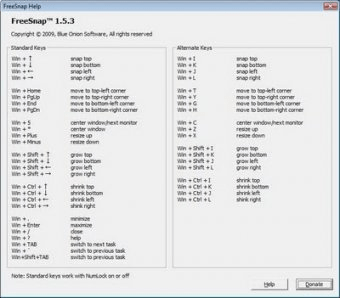
Ever try to size a window so it just touches the edge of the screen? It’s tedious (at least for me). FreeSnap allows you to instantly resize any window edge to the corresponding screen edge. Want that window to touch the right edge of the screen? Press and hold the left “Windows Key” (see illustration below) and press the right arrow. It’s just that simple. The number-pad keys work as well, regardless of the NumLock state.

What's new in version 1.5

Windows Key I snap to top edge
Windows Key K snap to bottom edge
Windows Key J snap to left edge
Windows Key L snap to right edge
Windows Key T move window to top-left corner
Windows Key G move window to bottom-left corner
Windows Key Y move window to top-right corner
Windows Key H move window to bottom-Windows
Windows Key C center window (move to next monitor when multiple monitors detected)
Windows Key Z grow window
Windows Key X shrink window
Report a wrong version Report a wrong program title Suggest a correction

Screenshots

FreeSnap FreeSnap

Latest comments


There are no comments, be the first one!
Add new comment

E-mail Address:

Password:

Register now »

Forgot password?

Sign in with:
Download Software Informer Client
Copyright © 2012, Informer Technologies, Inc. About| Privacy and terms| Help| Feedback & Support| Partners program